
PrestaShop is a powerful open-source solution for building and managing online shops. It is particularly appreciated for its flexibility and its many features suited to the needs of ecommerce merchants.
In this article, we will look at how PrestaShop works and how to make the most of its tools to optimise your business.
What is PrestaShop and what are its advantages?
What is PrestaShop?
PrestaShop is an open-source ecommerce platform (meaning the code is open to the public so it can be more collaborative), created in 2007, that lets you design, customise and manage online shops. Used by thousands of merchants around the world, PrestaShop offers an intuitive interface and a full range of tools for managing products, orders, customers and much more.
Whether you are a beginner or an ecommerce expert, PrestaShop adapts to your needs thanks to its great flexibility.
The advantages of PrestaShop
- Free and open source: PrestaShop is free to download, which lets small businesses get started without a high initial investment. Its open-source nature gives you total freedom to customise and adapt the platform to your needs.
- Ease of use: PrestaShop’s user interface is friendly and intuitive, making day-to-day operations easy to manage, even for those without in-depth technical knowledge.
- Functional richness: PrestaShop offers more than 600 native features, notably for managing products, payments, deliveries and order tracking. It also supports several currencies and languages, which makes it ideal for international ecommerce.
- Advanced customisation: With a wide choice of themes and modules, PrestaShop allows deep customisation to match your brand’s visual identity and your customers’ expectations.
- SEO-friendly: PrestaShop includes strong SEO tools to improve your shop’s ranking in search engines. This includes optimising URLs, meta tags and descriptions.
- Active community: With a worldwide community of users and developers, you get constant support to solve problems and improve your shop.
- Scalability: PrestaShop suits small shops and large retailers alike. You can add modules and upgrade your infrastructure as your business grows.
With these many advantages, PrestaShop stands out as an essential solution for businesses wanting to start or grow in online retail.
Installing PrestaShop
Local installation
Installing PrestaShop locally is ideal for testing its features without investing in hosting from the start. To do so, simply set up a local server such as XAMPP or WAMP, download PrestaShop from the official website, then install it by following the instructions provided.
Installing on a server
For online use, installing PrestaShop on a server is essential. Choose a compatible hosting provider, set up your database, transfer the PrestaShop files via FTP and run the installation process. This method makes sure your shop is accessible to your customers.
Configuring PrestaShop
Once installation is complete, configuring PrestaShop is crucial to customise your shop. Among the things to set up:
- General settings: shop name, language, currency.
- Tax management: add rates by region.
- Delivery options: set up carriers and shipping costs.
- Payment methods: integrate modules such as PayPal, Stripe or other payment solutions.
Managing your shop on PrestaShop
Product management on PrestaShop
PrestaShop allows advanced product management. You can create detailed product pages with descriptions, images and variants (size, colour, etc.). Stock management features make sure your inventory is always up to date.
Order management in the PrestaShop back office
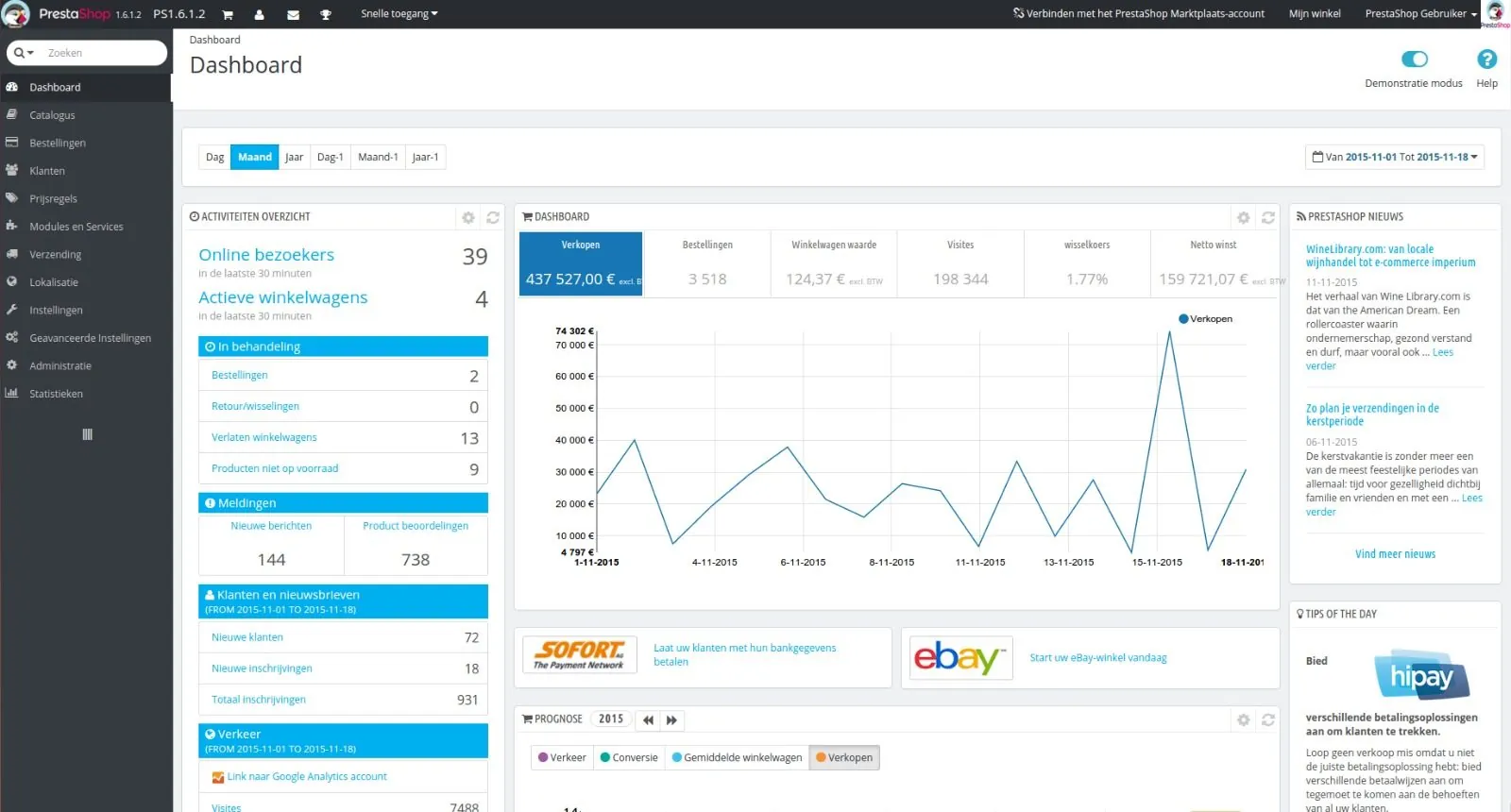
The PrestaShop dashboard gives an overview of current orders. You can view the details of each order, manage returns and track shipping statuses.
Customer management with PrestaShop
PrestaShop makes customer management easier with a profiling system that groups the essential information: purchase history, addresses and preferences.
Customising PrestaShop
Choosing and installing themes
PrestaShop offers a wide variety of themes, free or premium. These themes, often responsive, ensure smooth navigation on all devices. You can install a theme through the PrestaShop back office or customise it to match your visual identity.
Editing templates
With PrestaShop, you can edit the templates to create a unique shop. The customisation tools let you adjust colours, typography and page layouts.
Modules and extensions
PrestaShop has many modules to extend your shop’s features. Popular modules include:
- Payment modules: PayPal, Stripe.
- Delivery modules: Colissimo, DHL.
- Marketing modules: newsletters, basket discounts.
- SEO modules: improve the visibility of your online shop.
Advanced PrestaShop features
Tax management with the PrestaShop interface
PrestaShop simplifies tax management according to regions and local regulations. You can set variable rates for your products and services.
SEO optimisation of your ecommerce site
PrestaShop’s SEO features let you optimise your product pages, categories and pages for search engines. You can customise meta tags, URLs and descriptions to improve your ranking.
Backup and security
It is essential to back up your shop regularly and keep your installation up to date to avoid vulnerabilities. PrestaShop provides tools to make these processes easier.
Migrating and updating PrestaShop
Migrating to PrestaShop
If you use another platform, PrestaShop offers tools and modules for a smooth migration of your data, products and customers to its solution.
Updating PrestaShop
Updating PrestaShop is crucial to get the latest features and keep your site secure. Use the native module to automate this process without risk of data loss.
Why choose PrestaShop?
PrestaShop is a complete solution for ecommerce merchants. With its advanced customisation, efficient management tools and varied modules, it adapts to businesses of every size. Whether you are a beginner or a professional, PrestaShop provides the tools you need to succeed in building or redesigning your ecommerce site.