A website redesign means rethinking a site that is already live (design, technology, content, navigation, features) so that it once again serves your business goals, your visitors’ needs and your customers’ expectations. Is your website outdated, slow, hard to update, or no longer bringing in new customers from Google? Our web agency advises you at every stage of the project: audit, a strategy set around your resources, mockups, development, content migration, redirects, launch and then tracking the results.
Business website, ecommerce store or custom platform: unlike building a new site, a redesign doesn’t start from scratch. It keeps what works (well-ranked pages, useful content, customer data), protects the search rankings you have already earned and fixes whatever is holding back conversions. It is also a chance to revisit the user experience, your brand image, the look and feel and the visibility of the site, with a team that brings together web development, UX/UI, SEO and web analytics. The goal: a site that is faster, easier to evolve and easier to find online.
It’s time to consider a redesign when your site no longer serves your goals: it doesn’t display well on mobile, it’s becoming hard to change, it’s no longer secure or it has slipped down the search results. The four signs below are the most common, and each one is also an opportunity to take a fresh look at your digital strategy.
An outdated web design
Users’ tastes and expectations have changed a lot in recent years, and the dominance of mobile has rewritten the rules. A site that isn’t responsive, or that looks dated, holds you back online. A web design refresh, with visual guidelines true to your brand identity and a consistent look across the whole site, builds trust with your visitors.
A user experience (UX) that needs work
Usability matters more than ever. Confusing navigation, information that’s hard to find, a contact form that’s too long: the bounce rate climbs and leads dry up. A redesign lets you optimise this conversion lever, and it also helps your site rank in search engines.
Outdated technology
A website’s life cycle is fairly short, and new CMS versions can quickly stop your site from working properly. Unmaintained modules, old code, incompatible plugins: these can even open up security holes and leave you exposed to hackers. A redesign protects you and gives you the chance to work on the site’s technical performance, such as page speed.
Search rankings that have stalled
There are more and more websites out there, and to stand out you need to work on your site’s organic search (SEO). But when too many factors are holding it back, the only answer is a redesign: fixing the problems, rethinking the menu and site architecture, or simply reworking the semantic structure of your pages.
The stages of a website redesign
Redesigning a website is a complex process: each phase prepares the next, and a skipped step usually comes back to bite you once the new site is live. Here is how we run a redesign project, from the first audit to ongoing follow-up.
Auditing the current site
This is the first step of any successful redesign. It’s essential to review every element carefully to avoid mistakes: traffic and the pages that convert, content to keep, features in use, technical blockers, how you compare with your competitors. There are almost certainly parts of the current site worth keeping, and the audit sorts the main strengths from the areas for improvement.
Setting goals and writing the specification
Once the site has been analysed, the areas for improvement follow naturally. Together we set the goals for the new website (quote requests, sales, enquiries, brand awareness), the target audience, the features you need and the KPIs that will measure success. It all goes into a specification that serves as the reference for the whole team, so the project can be followed without losing information along the way.
Site structure and mockups
Our UI designer creates the site structure, the wireframes and then the visual mockups, based on your needs and your brand guidelines. You approve the navigation and the design before a single line of code is written: this is the moment to evolve the look of the site without starting over with every round of feedback.
Development and content integration
We build the new site on the platform that suits your project (WordPress, PrestaShop) or as a custom build in Symfony, then integrate the content: texts kept or rewritten, optimised images, product pages, blog posts. The data to be migrated (customers, orders, products) is transferred and checked.
Redirect plan and testing
Every old URL is mapped to its new address in a 301 redirect plan, so that your visitors and search engines find the right pages. The site is also tested in a dedicated environment, on a beta version (forms, checkout, mobile display, speed), before it goes live.
Launch and follow-up
From the switchover, we track traffic and visitor behaviour, indexing in Google Search Console and conversions, so we can quickly fix anything that needs it. You keep control of the back office: you can add pages and new content without having to call us.
Mistakes to avoid during a redesign
Most disappointing redesigns go wrong for the same reasons. Knowing them from the design phase onwards means you can avoid them:
Forgetting the old URLs: without a redirect plan, every link to the old site leads to an error, for your visitors and for search engines alike.
Changing the design with no clear goal: a new web design achieves nothing if it doesn’t meet your visitors’ expectations. Decisions should be based on the site’s data, not just on personal taste.
Neglecting the content: deleting pages without checking their traffic, or copying texts across unchanged, loses a key part of your search rankings. Decide early on who writes and who approves each part.
Underestimating data migration: customer accounts, orders, newsletter subscribers, forms connected to your CRM: list everything in the specification.
Leaving your teams out: your sales, customer service or marketing teams use the site every day and know what’s missing. Asking them early avoids a lot of changes at the end of the project.
Not tracking the results: without measurement after launch, there’s no way of knowing whether the redesign is meeting its goals. Lead and conversion tracking must be set up and checked before the switchover.
How do you audit a site before redesigning it?
The audit compares what the site actually delivers with what you expect from it. It relies on your statistics (Google Analytics, Search Console) rather than gut feeling, and answers a simple question: what do we keep, what do we improve, what do we remove?
Traffic and conversions: most visited pages, traffic sources, conversion rate, bounce rate, the journeys that lead to an enquiry or a sale.
Search rankings: keywords and pages that bring in organic traffic, backlinks to preserve, technical errors to fix.
Existing content: useful pages to keep, content to update, duplicates to merge.
Features: tools used by your customers and your team (customer area, CRM, payment, newsletter), integrations to keep or replace.
It’s hard to make the right calls when development isn’t your job. Luckily, it’s ours! We take the time to analyse everything with an expert eye, to understand your business’s challenges, constraints and target audience before advising you.
Redesign and SEO: how do you keep your Google rankings?
A redesign is the ideal opportunity to work on your site’s SEO, but also the riskiest moment if it already has strong organic rankings. Without redirects, the pages that brought in traffic return an error, and positions built up over years can vanish.
Google spells this out in its documentation on site moves: it recommends permanent server-side redirects (301) from each old URL to the equivalent new page, generally kept for at least a year, and warns that a move can take a few weeks for a small or medium-sized site, longer for a large one, with temporary fluctuations in search visibility in the meantime (Google Search Central, “Site moves with URL changes”).
In practice, we prepare the SEO side before development starts: it’s essential to avoid nasty surprises. Here is how we go about it:
URL inventory of the site’s pages that generate traffic or links.
Redirect plan page by page, without sending all the old pages to the home page.
Content optimisation: title tags, subheadings, internal linking, keywords for each page.
Checks at launch: 404 errors, indexing, sitemap in Search Console.
An online store brings its own challenges: product catalogue, product pages, checkout, payment methods, customer accounts, sales history. An ecommerce redesign must improve conversions without losing data or revenue during the switchover. It’s also a chance to simplify the checkout and the day-to-day management of your catalogue.
Depending on the number of products and how complex the catalogue is, we recommend PrestaShop or, for a simpler catalogue, WordPress with WooCommerce (see our ecommerce website page). For a store already on WooCommerce or PrestaShop, staying on the same platform often keeps the project simpler. Customers, orders and products are migrated to the new platform, and the purchase journey is tested end to end before going live.
Two ecommerce redesigns delivered by our team:
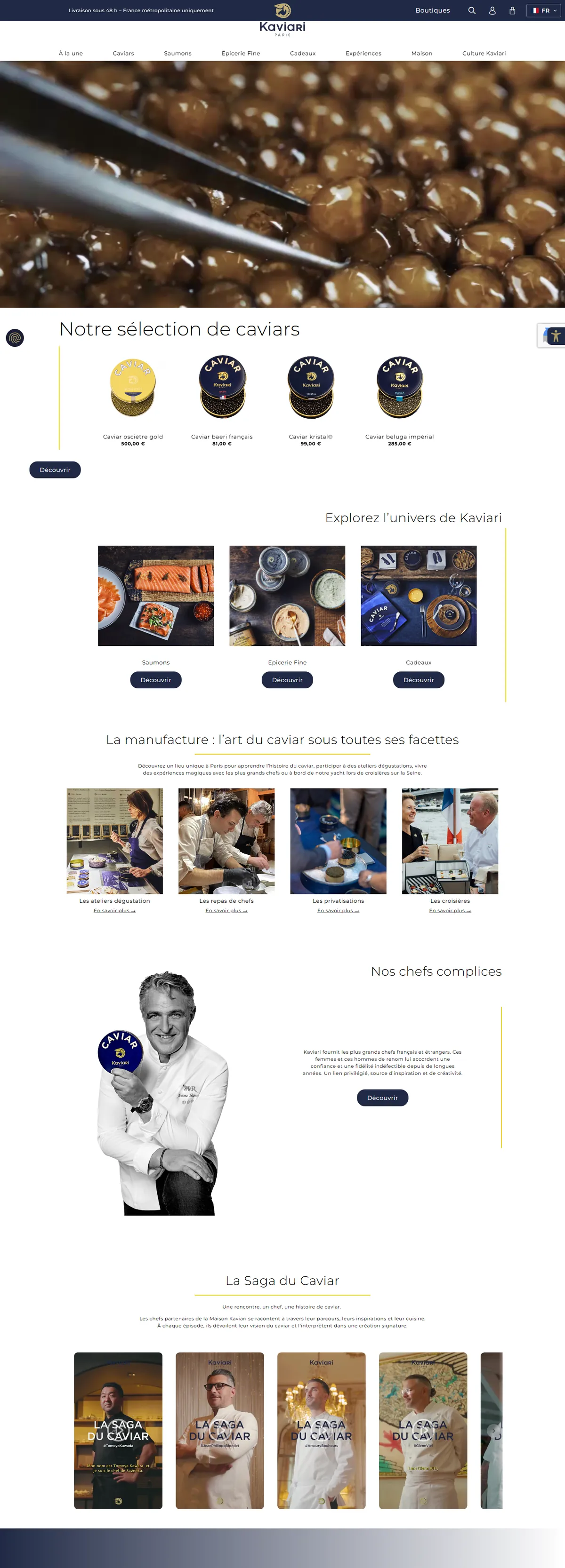
Kaviari: redesign of a caviar house’s PrestaShop site, with reworked UX/UI, a custom checkout, SEO content and a clean site, with no in-house module blocking updates.
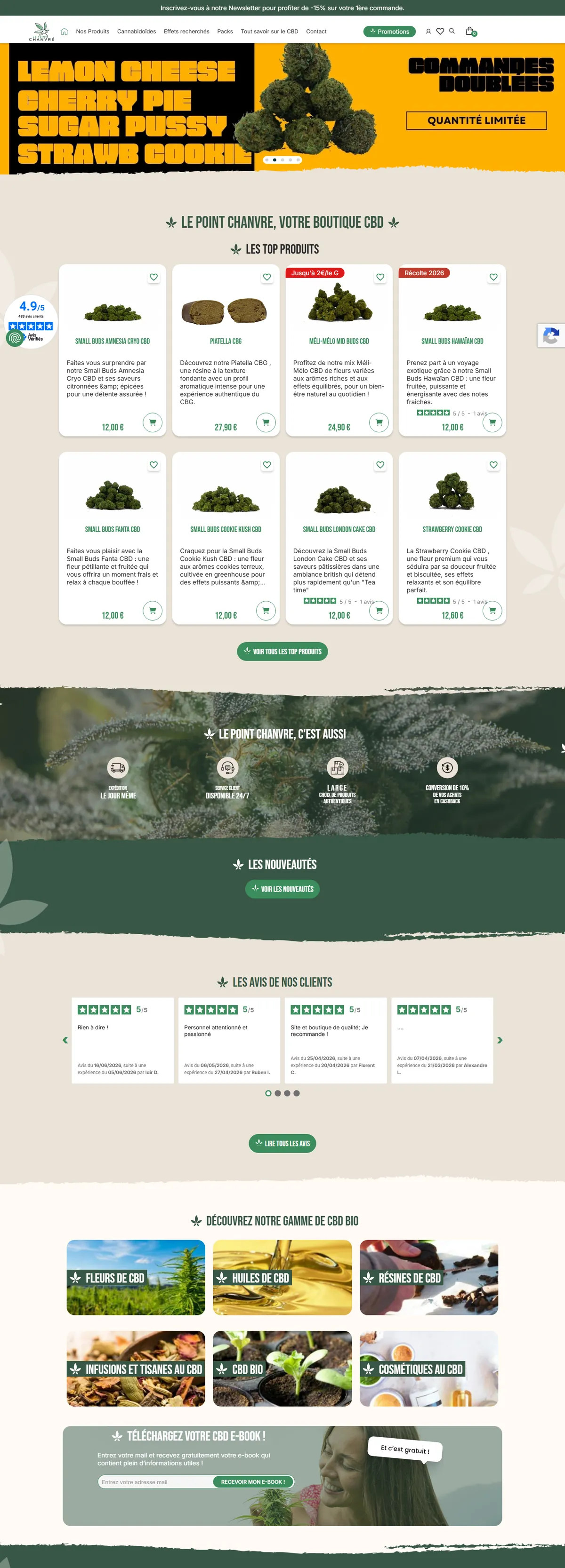
Le Point Chanvre: a store with several hundred products whose structure was completely reorganised and whose product pages were reworked, for a site that is easier to browse, clearer information on every product and an SEO-optimised site.
Our business website and custom redesign projects
A redesign doesn’t mean keeping the same technology. Depending on your needs, we stay on the same tool, switch to a different system or move to a custom build:
Billards Bréton: migration from PrestaShop to WordPress, redesign of the business website and integration of the online store.
Adhoc Consult: redesign of a consulting firm’s WordPress website, with SEO support.
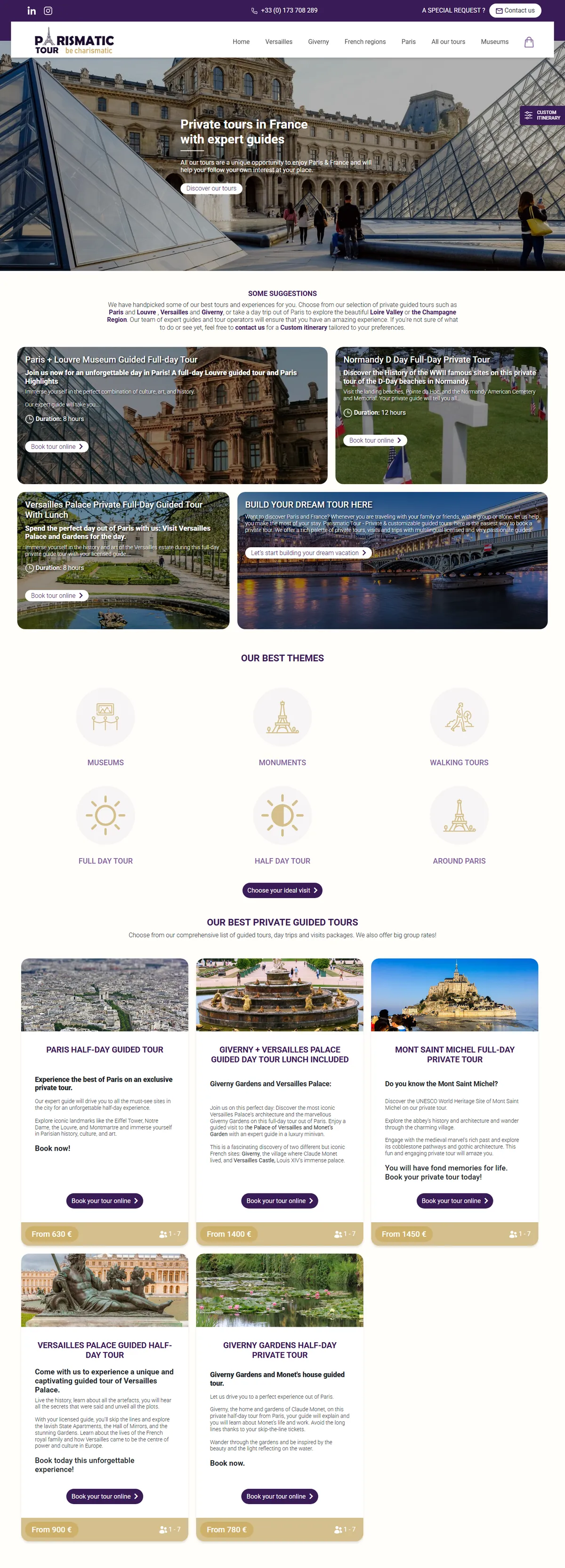
Parismatic Tour: a WordPress site overloaded with plugins and hacked several times for lack of updates, rebuilt entirely as a custom Symfony application to meet specific needs, with a testing period on a beta version.
A website redesign raises many technical, design and SEO questions, and every decision affects how the site will evolve. To avoid losing rankings, you’re better off working with professionals who handle redesign projects from start to finish.
A freelancer can be a good fit for a simple business website or a specific task, but one freelancer doesn’t always cover design, SEO and data migration. An agency brings together several specialists (development, UX/UI, SEO, web analytics) and provides continuity of follow-up, a real advantage if you’re short of in-house resources. Be wary, however, of anyone who promises a ranking: nobody can guarantee a position in the search results. At Web Opteam, you have a single point of contact, backed by a team of web professionals, and project tracking shared in your Hub Opteam client area.
A web agency also keeps a constant eye on what’s new: it can advise you on the latest features that would benefit your site, on your digital communication strategy and on good practice for accessibility and security.
How much does a website redesign cost?
There’s no single price: the cost of a redesign depends on its scope. The number of pages, whether content is reused or written from scratch, the features to build (store, customer area, connection to a CRM), the choice between an off-the-shelf solution and a custom build, and the amount of data to migrate all affect the budget.
To estimate what your project will cost, we start with an initial conversation and, if needed, an audit of the site. You then receive a detailed quote that sets out what is included (mockups, development, migration, SEO) and what remains your responsibility. After launch, a website maintenance contract keeps the site up to date and secure and takes care of its future changes.
A successful redesign always starts with an analysis of the existing site. This defines the strategy: what to improve and which goals to aim for. Then come the mockups, development, content migration and the redirect plan. Don’t forget follow-up after launch, made much easier by well-configured analytics tools, to make the final adjustments.
What is a website redesign?
A redesign doesn’t necessarily mean starting all over again; it means improving the current site. To get it right, pay close attention to what you like and want to keep on the site, and to what has been identified as needing improvement.
Redesign or a brand-new website: how do you choose?
If your site ranks well, has useful content and a sound technical base, a redesign lets you keep those gains while offering a better user experience and a modernised design. If the technology is too old or too far from your needs, it’s better to rebuild on a new foundation, keeping your content and addresses thanks to redirects. The audit helps you decide, without losing sight of what the old site did well.
Should you change CMS during a redesign?
Not necessarily. Staying on the same tool, in a recent version, makes the migration simpler and limits the changes for your teams. Switching systems makes sense when the tool no longer meets your needs: moving from PrestaShop to WordPress for a site that is mainly a business showcase, or to a custom build when your needs are too specific for a standard solution.
What if your next website became your best salesperson?
Keep in touch!
We reply within one business day, in English, with an honest first opinion, even if it shakes things up a little.