
Welcome to the fascinating world of UI design, a universe where creativity, ergonomics and psychology blend to give visitors memorable experiences on a website (or sometimes frustrating ones, but not on yours, of course). Whether you are a newcomer, a professional designer, or just curious, this article walks you through the essentials of interface design, and humour will be on the menu, because seriously, who said graphic design had to be boring?
UI vs UX: the war of the acronyms
Before going any further, let’s be clear: UI design (User Interface) and UX design (User Experience) are not the same thing, but they work hand in hand like two best friends.
- UX design is about the user journey, prototypes, ergonomics and the pleasure of navigating an app or a website.
- UI design, on the other hand, is the visual star: colours, the layout of the website’s pages, graphic features, in short everything you see and click.
To sum up: if UX is the brain, UI is the charming smile.
The fundamentals of UI design: winning users over from the first click
Simplicity and clarity: no gadget fair in your UI
A good interface design should offer a smooth, easy and intuitive experience without overwhelming the user. The goal of working on UI is to make actions simple and obvious, without the user having to think at every step.
- Intuitive navigation: Use clear menus and explicit icons, and avoid cluttered pages. A user should be able to reach their goal in just a few clicks.
- Interactive interfaces: Favour interactive elements that guide the user. For example, clearly visible call-to-action buttons or subtle transitions to signal a change of state.
- Examples of successful simplicity: Apps like Spotify or WhatsApp illustrate this principle perfectly. They offer a clear interface where the essential features are accessible as soon as you open them.
- Tip: Adopt a mobile-first design: mobile (smartphones, tablets) dominates the web. By designing for small screens first, you make sure your interface stays effective and pleasant on every device.
UI consistency: your interface should speak with one voice
Consistency in UI design is essential for a uniform user experience. It means keeping design standards across the whole project.
- Consistent fonts and colours: Limit yourself to two or three fonts and a well-defined colour palette. This avoids distracting or confusing the user.
- Icons and styles: Choose icons with a consistent graphic style. If you go for minimalist icons, avoid adding detailed components that break the harmony.
- Design patterns: Use recognised design patterns to guide the user. For example, a “Back” button at the top left or a well-placed search bar.
- Design systems: Take inspiration from frameworks such as Google’s Material Design or Apple’s Human Interface Guidelines to create consistent interfaces.
Ergonomics and usability: the art of staying out of the way
Ergonomics aims to make user interaction as natural and fluid as possible. If your interface is ergonomic, users will reach their goals without feeling lost or frustrated.
- Information architecture: Organise your pages by ranking information logically. Put the important elements where visitors expect to find them, such as a basket at the top right or a menu at the bottom for a smartphone app.
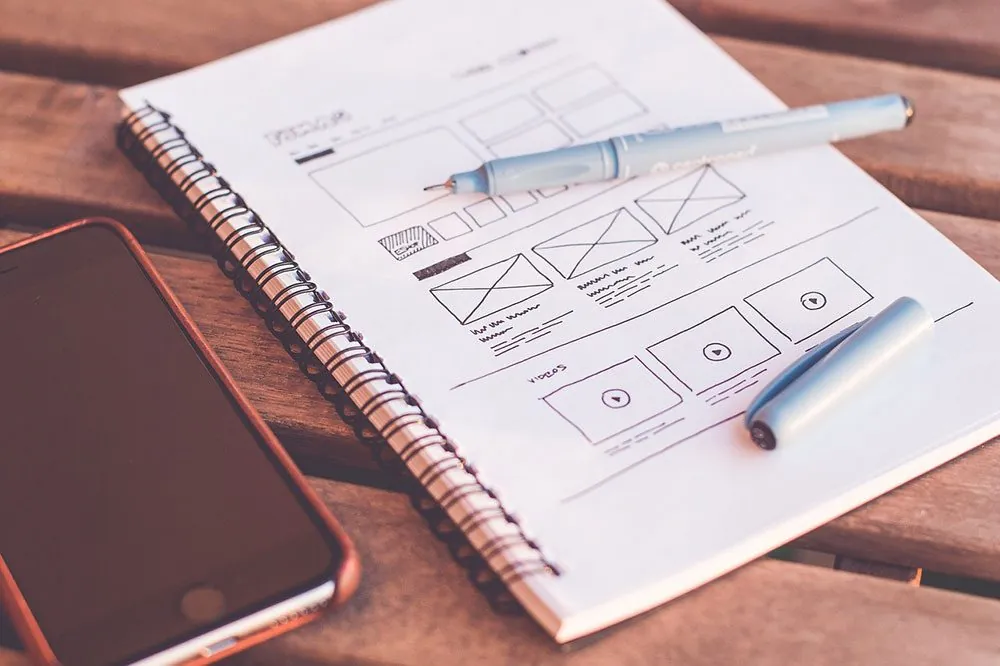
- Wireframes and mock-ups: Before signing off an interface, create wireframes to structure the sections. Once this structure is set, move on to mock-ups with detailed graphics that include colours, typography and icons.
- User testing: An ergonomic site can only be guaranteed once it has been tested. Run tests with a representative sample of your users to identify friction points.
- Accessibility: Make sure your interface is usable by everyone, including people with disabilities. This means sufficient contrast, readable fonts and descriptions for screen readers.
With these principles well applied, you are well on your way to creating a user interface that wins people over from the first click while delivering an unforgettable user experience.
The UI designer’s tools: your best digital friends
Figma: the champion of collaborative UI platforms
With Figma, you can create mock-ups while collaborating in real time with your developers and colleagues thanks to shared accounts. Bonus: it runs in your browser.
Sketch: an essential classic for UI
Sketch remains a favourite for UI designers, notably thanks to its component libraries and ease of use.
Adobe XD: creativity at the service of UI design
If you like the Adobe ecosystem, Adobe XD is perfect. It offers everything you need for interactive prototypes, interaction design, and even mobile-first design.
UI kits and feature libraries
Whether on UI8, Dribbble or other platforms, download UI kits to speed up your work. These kits contain ready-to-use elements such as buttons, menus and icons.
The UI design creation process
UI starts with understanding user needs
The starting point of every UI project? Having the skills to understand the user. This means a thorough analysis of their requirements, expectations and frustrations. Ask yourself the right questions:
- What problems is the user trying to solve?
- What are their habits? Do they prefer to browse on a smartphone, tablet or desktop?
- Where do they get stuck?
Use tools such as surveys, personas and user journey maps to get a clear picture of their expectations.
Look for inspiration for good UI
Even the best designers need inspiration. Explore platforms like Behance, Dribbble or even Pinterest to discover the latest design trends. Look at what works in projects similar to yours:
- Which graphic elements catch the eye?
- Which interfaces feel intuitive?
- How are the pages structured?
Keep a notebook or an inspiration board to note down ideas that could enrich your own project and your UI plan.
Create UI wireframes and mock-ups
Creating wireframes is a crucial step in website development for laying the foundations of your user interface without getting lost in visual details. Here is how to go about it:
- Wireframes: These simplified diagrams define the structure of your interface. They show where the menus, buttons and key content sit.
- Graphic mock-ups: Once the wireframes are approved, move on to visual design. Add colours, typography and other graphic elements to bring your ideas to life.
- Interactive prototypes: Simulate interactions (clicks, transitions) to test how your interface behaves before development.
Testing is king in UI
An interface can look perfect on paper, but nothing beats user feedback. Here is how to go about it:
- User tests: Have a representative panel test your prototype. Watch how they interact with the interface and identify areas of confusion or improvement.
- Tools like Hotjar or UsabilityHub: These tools let you collect data on visitor behaviour, such as the most clicked areas or the most used paths.
- Iterations: Tests often reveal adjustments to make. Refine your design until you get a smooth, intuitive interface.
With a structured, user-centred creation process, you can be sure of designing work that combines aesthetics, functionality and user satisfaction.
The importance of responsive design
Today, good UI design must be responsive and adaptive. Why? Because your users switch from mobile to desktop as often as they change socks. A design for mobile platforms must therefore offer an experience just as pleasant as on a computer screen.
Adapting to every screen
Responsive design makes sure your interface adjusts automatically to different screen sizes, whether a smartphone, a tablet or a computer screen. It avoids the frustration of difficult navigation or badly displayed content.
Prioritising mobile-first
Taking a mobile-first approach means designing for small screens first. Why? Because mobile users account for a majority of web traffic today. This method pushes you to simplify your interfaces and focus on the essentials.
Improving the user experience on every platform
Good responsive design improves the overall user experience:
- Smooth navigation between devices.
- Interactive elements that are easy to use, such as well-spaced buttons.
- Optimal readability, even on small screens.
Boosting your visibility and SEO
Google favours mobile-first websites in its search results. Responsive design can therefore improve your ranking in the SERPs and attract more visitors.
In short, responsive UI design is essential to meet the expectations of modern users and of organic search. It makes sure your interface stays pleasant and functional whatever device is used.
UI design trends in 2025
1. Dark mode everywhere
Dark mode keeps winning people over for several reasons: it reduces eye strain, saves battery on OLED mobile devices, and adds a touch of elegance. Users love customising their experience, and offering a dark mode has become an expected standard.
2. Micro-interactions
These small details, such as button animations, transitions or hover effects, make the interface more engaging and intuitive. For example:
- A button that subtly changes colour when you hover over it.
- An animation showing that content is loading or an action has been confirmed.
- Visual or audio feedback that reinforces the user interaction. Micro-interactions improve not only aesthetics but also communication between the interface and the user.
3. Colourful minimalism
The era of cluttered pages is over. Today, minimalism is still king, but with a modern touch of bright colours. Bold palettes and subtle gradients add a dynamic dimension without overloading the design. Examples:
- Neutral backgrounds with colour accents to guide attention.
- Strategic use of white to highlight the essential parts.
4. Voice UI
With the rise of voice assistants such as Alexa, Siri and Google Assistant, voice interfaces are becoming essential. Users now expect to interact with apps without touching a screen.
- Use case: Voice search to find a product, order a service, or navigate an app.
- Challenges: Designing a smooth voice interface requires a fine understanding of user intent and usage contexts.
The 2025 UI design trends show that the future is centred on adaptive, attractive interfaces, designed above all to anticipate users’ needs.
UI design: between creativity and technique
Being a UI designer means juggling art and technique. You need to grasp your users’ needs while working closely with the developers of websites. A good digital user experience design isn’t content with being pretty: it has to be functional, fast and intuitive.
With tools like Sketch, Adobe XD or Figma, and a user-centred approach, you have all the cards in hand to design unforgettable interfaces. So, ready to turn your projects into real digital masterpieces?