Your website is well designed. Your content is good. Your keywords are carefully chosen.
And yet Google doesn’t crawl your pages in depth, your blog posts don’t show up in search results, and a good part of your site stays in the shade. You can look for the problem in your backlinks, in your WordPress theme or in the latest SEO tutorial doing the rounds online — the answer is often elsewhere: in your internal linking and in the click depth of your pages.
In SEO, internal linking is one of the most powerful and least exploited levers in the trade. Not as glamorous as paid link building, less visible than a video that goes viral, less followed than a tool comparison — and yet optimising internal linking can radically change the game for any web page.
It’s an approach that gives more power to your existing content, links your pages together intelligently to limit blind spots, and adds value to every query you target — without spending an extra penny.
In this complete guide, we explain everything about how to optimise your internal linking: definitions, mistakes to avoid, best practices and tools. Whether you’re an occasional reader looking for information on the subject, or a professional looking to add a comparison of solutions to your resource menu, this guide covers each topic by name, with its concrete effects on your SEO.
The goal? That you, whether you’re an agency, a consultant or simply a curious reader, walk away with a clear action plan to turn your site’s internal linking into a real engine of visibility.
What exactly is click depth?
Definition and the notion of depth level
Click depth (also called page depth) is the number of clicks needed to reach a given page from your site’s homepage. In practice: if a visitor has to click three times to reach a page, that page is said to be at depth level 3.
If it takes six clicks, it’s at level 6. And the deeper a page is, the harder it is to reach — for visitors and for search engines alike.
This notion is fundamental in SEO, because it directly determines Google’s ability to crawl and index all of your pages. A website whose strategic pages are buried four, five or six levels deep sends a bad signal: it implicitly tells crawlers that these pages aren’t very important. And Google, which is a very busy search engine, tends to believe it.
For effective keyword research, it’s important to understand the user’s search intent. Using analysis tools such as Google Keyword Planner or SEMrush can help you discover the most searched keywords and current trends.
You should also look at long-tail keywords, which are longer and more specific phrases than the main keywords. These terms usually have less competition and can attract a qualified audience.
Website hierarchy: from the homepage to the deepest pages
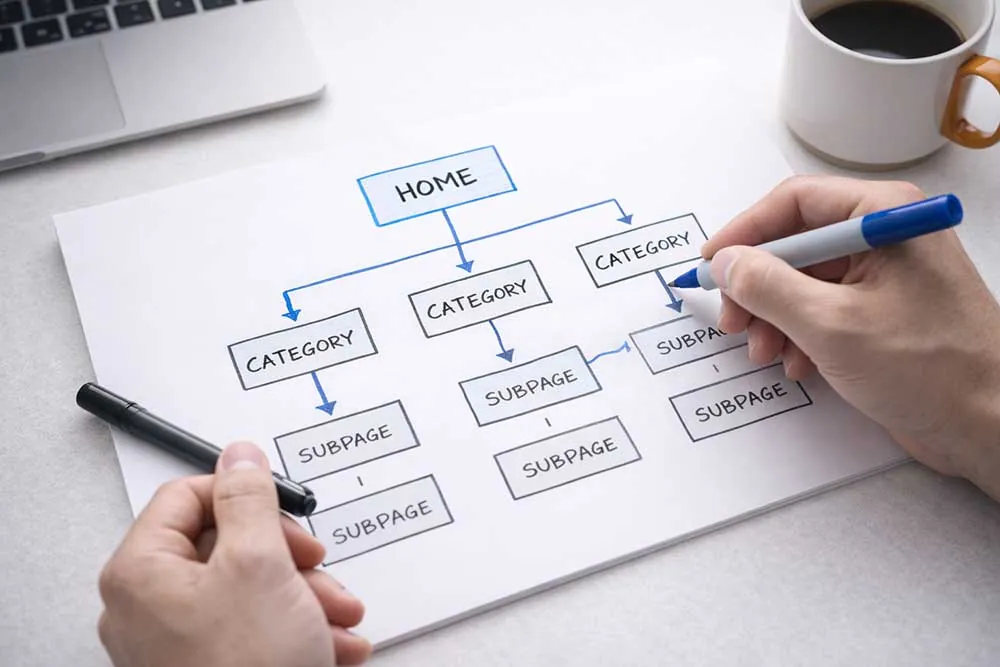
Every website structure follows a hierarchical logic. At the top is the homepage — level 0, the starting point of everything. Below it are the main pages (categories, sections, services), generally at level 1 or 2.
The further down the structure you go, the more specific the pages become: subcategories, blog posts, product pages, tag pages, pagination pages.
The classic mistake, particularly on e-commerce sites or blogs with many articles, is to let this hierarchy deepen without controlling it. You then end up with strategic pages lost at level 5 or 6 of the structure, invisible to robots and hard to reach for users.
This is exactly what work on click depth and internal linking aims to correct.
An effective meta description should be attractive, contain the main keywords, and give a clear preview of the page’s content. It’s recommended to include a call to action to encourage users to visit your site.
Crawl budget: a limited resource not to be wasted
To fully understand why click depth matters, you need to understand the concept of crawl budget. Google allocates each website a certain number of pages it will explore on each visit of its robot. This budget isn’t unlimited: it depends on the site’s authority, its loading speed, its size and how often it’s updated.
If your site has hundreds of deep pages, useless URLs, orphan pages or a poorly organised structure, the robot will waste its crawl budget on pages with no added value and never reach your most important content. The result: unindexed pages, degraded organic search performance and flagging organic traffic.
The golden rule here, popularised in particular by SEO consultant Daniel Roch and picked up by many web marketing experts, is simple: every important page on your site should be reachable in three clicks at most from the homepage. It isn’t an absolute rule, but it’s an excellent starting point for assessing the health of your site structure.
Why click depth also affects user experience
Click depth isn’t only a technical SEO topic. It’s also — and perhaps above all — a question of browsing experience. A visitor who has to click six times to find what they’re looking for on your site will quickly lose patience, increase your bounce rate and reduce the time spent on the site.
These behavioural signals are analysed by Google, which factors them into its assessment of your website’s quality.
In short: reducing the depth of your strategic pages both improves user experience and optimises your organic search performance. A double effect you’d be wrong to pass up.
Internal linking in SEO: definition and importance
What is internal linking?
Internal linking is the set of internal links that connect the pages of a single website to one another. Unlike link building — which consists of obtaining external links (backlinks) from other sites — internal linking is entirely under your control.
You decide which pages point to which other pages, with which link anchors and in which context.
In SEO, internal linking has three main functions. First, it makes it easier for Google’s robots to explore the site: an internal link is an invitation to the crawler to visit a new page. Second, it distributes internal popularity between the site’s pages, steering link juice (SEO juice) towards the pages you want to promote.
Finally, it improves smooth navigation for users by guiding them naturally from one page to the next, extending their journey on your site.
Internal link vs external link: two different logics
It’s useful to distinguish clearly between internal and external links, because their role in SEO is different. An external link (or backlink) comes from another website and points to yours: Google sees it as a vote of confidence, a mark of authority granted by a third party. Link building aims precisely at obtaining these quality inbound links.
An internal link comes from a page on your site and points to another page on your site. Its role is less to build the domain’s overall authority than to distribute it intelligently within your site. It’s a free resource, available immediately, and it delivers a real SEO impact as soon as it’s in place.
That’s why an internal linking strategy deserves as much attention as work on external links.
Link juice and internal PageRank: how does it work?
Link juice is the SEO value passed from one page to another via a link. The more links a page receives (internal or external), the more popularity it accumulates. And the more it accumulates, the more it’s able to pass on to the pages it points to.
Internal PageRank is the internal version of this mechanism: it measures the relative authority of each page within your website. A page that is heavily linked from other pages on the site will have a high internal PageRank, which means Google will consider it important and position it more favourably in search results.
The goal of effective internal linking is therefore to channel this SEO juice towards the pages you want to push up the search results. It’s a form of strategic management of internal popularity, and it’s exactly what expert SEO consultants do when they talk about internal linking optimisation.
H3: Why internal linking is a powerful (and often underestimated) lever
The importance of internal linking is frequently underestimated, even by experienced SEO professionals. We spend weeks creating content, optimising tags, chasing backlinks… and forget to check that the site’s pages are properly linked to each other.
That’s a strategic mistake. A site with high-performing internal linking can significantly improve its visibility in search engines, increase its conversion rate by guiding visitors to the most relevant landing pages, and reduce its bounce rate by offering coherent, engaging user journeys.
In SEO, internal linking is one of the few levers that acts simultaneously on technique, content and user experience.
Internal linking mistakes to avoid at all costs
Orphan pages: when your pages talk to no one
The orphan page is every good SEO’s nightmare. It’s a page on your site that receives no internal link: nobody points to it, it’s cut off from the rest of the structure. The result? Google’s robot can’t find it through internal linking, it accumulates no internal popularity and so stays in the depths of the index — when it’s there at all.
Orphan pages are unfortunately very common, especially on active blogs where posts go out regularly without anyone taking the time to link the new articles to existing content. Fixing this is often one of the quickest high-impact actions in an SEO audit: you simply identify the orphan pages and add relevant internal links to connect them to the rest of the site.
A structure that’s too deep: the Swiss cheese of SEO
We covered it in the first part: excessive click depth is one of the most damaging internal linking mistakes. When your most important pages — product pages, key articles, service pages — sit five or six levels from the homepage, you send Google a bad signal and needlessly complicate navigation for your visitors.
The solution isn’t to flatten everything by putting all pages at level 1 — that would be another bad practice. The goal is to reduce the depth of strategic pages by restructuring the hierarchy and using internal linking to create smart shortcuts between important pages.
Generic and useless anchors
The link anchor is the clickable text a user clicks to follow an internal link. It’s a strong signal for Google: it tells it what the destination page is about. Using generic anchors such as “click here”, “read more” or “read the article” is therefore a missed opportunity to optimise the target page’s topic in the search engine’s eyes.
The best practice is to choose descriptive anchors that include the main keyword of the page the link points to. For example, instead of “click here to discover our SEO services”, prefer “discover our monthly SEO support”. It’s more natural for the user, and far more effective for your organic search performance.
Linking in the footer only
Putting all your internal links in your site’s footer is another widespread bad practice. Footer links are taken into account by Google, but they’re worth much less than contextual links placed within the main content.
A link naturally integrated into the body of an article, surrounded by relevant text on the topic, passes far more SEO juice than an isolated link in the footer.
That doesn’t mean you should avoid footer links — breadcrumbs, links to main pages or categories have their place there. But the footer can’t be the sole or main vehicle for your internal linking. The main content must play that role.
Poorly managed pagination
On e-commerce sites or blogs with many pages, pagination can become a real internal linking problem. Badly configured pagination pages can dilute link juice, create useless URLs that the robot wastes time crawling, and push your product pages or articles down into the depths of the structure.
The solution is rigorous pagination management: well-configured canonical tags, rel="next" and rel="prev" attributes if necessary, and above all contextual internal links that let you reach important content without going through all the pagination pages one by one.
The pillars of high-performing internal linking
Build an architecture of thematic silos
The basis of effective internal linking is a website architecture organised into thematic silos. A silo, in SEO, is a set of pages grouped around a single theme, linked to each other by internal links and clearly separated from the site’s other silos.
This semantic organisation sends a strong signal to search engines: it tells them your site has in-depth expertise on each theme covered, that the pages reinforce each other on a given subject, and that the overall structure is coherent and logical.
This is the principle of the semantic cocoon, popularised in France by Laurent Bourrelly and since taken up by the whole French SEO community.
In practice, each silo is made up of a pillar page — the main page on the subject, the one meant to rank for the most important keywords — and satellite pages that cover complementary sub-topics and all link back to the pillar page.
Links between pages in the same silo reinforce the topical relevance of the whole, while links between different silos are limited to avoid diluting topical strength.
Reduce the depth of strategic pages
One of the concrete goals of internal linking work is to reduce the depth of strategic pages. Several methods make this possible.
The first is restructuring the hierarchy: reviewing the site’s hierarchy to bring important pages up a level. It’s sometimes a substantial job, but the SEO impact can be significant, particularly on e-commerce sites with many categories and subcategories.
The second is using contextual internal links to create shortcuts: by linking directly from high-level pages (the homepage, the main category pages) to deep pages, you effectively reduce their depth without touching the structure. It’s a more flexible approach, ideal for sites whose structure can’t easily be changed.
The third is optimising global navigation elements: main menu, breadcrumbs, blocks of internal links in sidebars or at the end of articles. Each of these elements can be used to link deep pages to higher levels of the structure, thereby reducing their effective depth.
Optimise your internal link anchors
We mentioned it in the mistakes section, but it deserves a full discussion, so important a lever is anchor optimisation. A well-chosen internal link anchor does three jobs at once: it tells the user what they will find on the destination page, it tells Google the topic of the target page, and it contributes to the topical relevance of the source page.
To choose the best possible anchor, start from the main keyword targeted by the destination page. Work it naturally into a flowing phrase that fits the context of the sentence. Vary the anchors slightly from one link to another to avoid over-optimisation that Google could view negatively.
And above all, limit the number of internal links per page: too many links dilute link juice and make navigation confusing for the user.
Link old and new content together
A good internal linking strategy is ongoing work, not a one-off action. Every time you publish a new article or a new page, you should ask yourself two questions: which existing pages on my site point to this new page? And which existing pages will this new page point to?
The first question is often neglected. We publish a piece of content, optimise it, and forget to add internal links from older articles that could naturally refer to it. Yet it’s one of the simplest moves to improve a new piece’s visibility: by linking it from pages that already have authority, you immediately pass on part of their internal popularity.
The second question is just as important: every new piece of content should point to the pillar pages of its thematic silo, to complementary resources on the subject, and to the relevant conversion pages (contact pages, service pages, product pages).
That’s how internal linking becomes a real SEO strategy and conversion tool, and not just a random addition of links.
Tools to analyse and audit your internal linking
Screaming Frog: the Swiss Army knife of linking audits
Screaming Frog is probably the best-known and most widely used tool among SEO consultants for analysing a website’s internal linking. This desktop crawler — available in a free version (up to 500 URLs) and a paid version — lets you map all of a site’s internal links, identify orphan pages, measure click depth, spot redirect chains and detect 404 errors.
Its click depth report is particularly useful: it lets you see at a glance which pages are buried too deep in the structure and need internal linking work to come back up. It’s the ideal starting point for any serious SEO audit of a site’s structure.
Google Search Console: track crawling and spot problems
Google Search Console is a free tool provided by Google that gives valuable data on how the search engine crawls and indexes your site. Its coverage report lets you identify unindexed pages, crawl errors and exploration problems.
The internal links report shows which pages receive the most internal links — a useful indicator for checking that the distribution of link juice matches your strategic priorities.
Google Search Console complements Screaming Frog: where Screaming Frog analyses the technical structure of the linking, Search Console gives Google’s view of how your site is actually crawled. Using both side by side gives you a complete picture and lets you identify problems that one wouldn’t see without the other.
WordPress plugins for internal linking
For WordPress sites — which account for a very large share of sites in France and worldwide — several plugins can help manage internal linking. Yoast SEO and Rank Math include internal link suggestion features right in the content editor.
Dedicated plugins like Link Whisper or Internal Link Juicer let you partly automate the creation of internal links by suggesting or automatically adding links based on keywords.
These tools are useful for sites with a large number of articles or product pages, where manual linking would quickly become unmanageable. They don’t replace strategic thinking about the site’s architecture, but they save time and help avoid forgetting obvious internal links.
Other useful tools for analysing your linking
Beyond Screaming Frog and Google Search Console, several other tools deserve a mention in your SEO toolbox. Semrush and Ahrefs offer internal linking analysis features in their site audit modules, with visual reports that make problems easier to spot.
Majestic SEO, more oriented towards link building, is also useful for visualising a site’s internal link structure as a graph.
For limited budgets, open-source tools like Xenu Link Sleuth or online solutions like Sitebulb offer interesting features at lower cost. The essential thing is not to stick to eyeballing: without a crawl tool, it’s impossible to get a complete view of the internal linking of a medium or large site.
Web Opteam, your Paris-based SEO agency
The technical SEO audit: our approach to analysing internal linking
At Web Opteam, the SEO audit is the starting point of every engagement. Our SEO agency carries out complete audits covering every dimension of organic search: technical, content, link building, and of course internal linking. Our approach relies on high-performing tools — Screaming Frog, Google Search Console, Semrush among others — combined with expert analysis from our SEO consultants.
What sets us apart is our ability to turn data into concrete, prioritised actions. An audit report running to dozens of pages is only worth something if the recommendations are clear, ranked and adapted to the reality of your site and your industry. That’s exactly what we give you.
Our SEO consultants and their expertise in linking strategy
Our team of SEO consultants has several years of experience on varied projects — e-commerce sites, topical blogs, corporate sites, SaaS platforms. This diversity lets us adapt our internal linking strategy to each type of site, taking into account its technical specifics, its page volume and its commercial goals.
We’re convinced that internal linking is one of the most profitable SEO levers, notably because it works on resources you already own: your existing content, your site structure, your current pages. Before chasing new backlinks or creating new content, optimising what you already have may be enough to generate a significant SEO impact.
Tailor-made support: from audit to implementation
Our support doesn’t stop at the audit. Web Opteam helps you put the recommendations in place: restructuring the site hierarchy, creating internal links, optimising anchors, configuring navigation elements. Whether you have an in-house technical team or need us to take care of the whole job, we adapt to your organisation. We work remotely with clients worldwide, in English.
We also provide follow-up over time: after the optimisations are implemented, we track how crawling, indexing and search positions evolve to check the impact of what’s been done and adjust the strategy if needed.
SEO training for your teams
Because the best strategy is the one your teams understand and can evolve independently, Web Opteam offers SEO training for all levels. Our training covers the basics of organic search, technical SEO, content strategy and of course internal linking optimisation.
This training is delivered by our practitioner SEO consultants, who draw on concrete examples from real projects. It can be organised in person or remotely, depending on your preference. Contact us to find out more about our training offer and to receive a tailored programme suited to your team’s needs.
Internal linking is the plumbing of SEO. And it deserves your full attention.
Let’s not kid ourselves: internal linking isn’t the sexiest subject in organic search. It doesn’t have the glamour of backlinks won on authority sites, nor the visibility of a well-written piece that takes off on Google. But it’s one of the silent foundations that make a site really perform — or not.
High-performing internal linking means a site Google loves to crawl, deep pages that climb up the search results, users who navigate naturally from page to page and conversion rates that improve. It’s also a lever entirely in your hands, which doesn’t depend on third parties and which can be activated today.
So, ready to put your site under the scanner? Start with an audit of your internal linking — whether you do it yourself with the tools presented in this guide, or call on our SEO agency. Either way, you’ll have everything to gain.
And if you have any questions, you know where to find us. Contact the Web Opteam team: we have coffee, crawlers, and a real passion for well-placed internal links.
Further reading: the basics of internal linking and the silo linking method.