Imagine spending hours writing a quality article, polishing every word, perfecting the title and the meta description — and Google decides not to index it because it looks too much like another page already on your own site.
Frustrating? Yes. Common?
Terribly. Duplicate content in SEO is one of the most widespread, least understood and easiest-to-avoid mistakes, once you know what to look for. And after a few minutes with this guide, you’ll understand why duplicate content can seriously damage your visibility in Google search results.
Whether you’re a web copywriter, a marketing manager at a Paris agency, a website owner or an SEO professional based anywhere in the world, this topic concerns you — even if you don’t realise it yet.
Because duplicate content isn’t just the obvious copy-paste of a text plagiarised from another site. There are dozens of technical and editorial causes that create content duplicated across several web pages without even the best writers noticing — internal or external, visible or not.
In this complete guide, we explain everything in plain English, with a clear and accessible outline: definition, the main causes of duplicate content on your site, tools to avoid and detect duplicates, and practical solutions — changing the code, using the canonical tag, rewriting the text or even speeding up rewriting with tools such as Grammarly.
The goal: make every page of your website speak with one voice to Google — and make avoiding duplicate content a natural reflex in your content strategy.
Duplicate content: definition and the reality of the problem
Definition of duplicate content in SEO
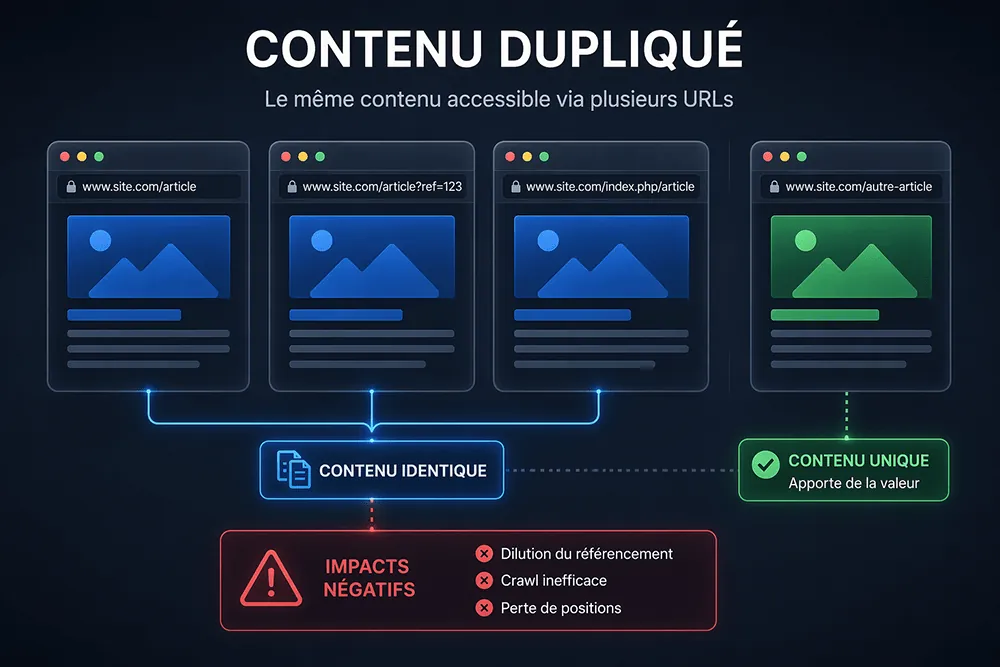
Duplicate content refers to any content on a web page that appears identically or very similarly on several different URLs, whether they are pages of the same site (internal duplicate content) or of different websites (external duplicate content).
In SEO, content is considered duplicate as soon as two or more pages present identical or sufficiently similar content that search engines struggle to work out which one is the original source and which one should be indexed first.
Google’s official definition is deliberately broad: the text doesn’t need to be copied word for word to count as duplicate. Content that is more than 70-80% similar, near-identical product descriptions, or the same article published on several different URLs are all cases of duplicate content in the eyes of the search engine.
Internal duplicate content vs external duplicate content
It is essential to distinguish the two main types of duplicate content, because their causes and their solutions differ.
Internal duplicate content happens within a single website: several pages of your own site present identical or very similar content. It is the most common type of duplicate content on your site and often the easiest to fix, but also the hardest to find without a dedicated tool.
A real-life example: a product page reachable through both /category-a/product and /category-b/product — two different URLs for the same content, which directly dilutes the ranking of that page in the search results.
External duplicate content happens between two different websites. Either your original content has been copied and pasted by a third party without permission (content theft), or you have published the same content on several different domains (syndication without precautions).
In the latter case, if the canonical tag isn’t used correctly, Google may index the copied version rather than your original content — which is particularly damaging for your SEO strategy.
The difference between identical content and similar content
Not all cases of duplicate content are equal. We generally distinguish strictly identical content — pure word-for-word copy-paste — from similar content, which shares much of its structure, wording or information without being strictly identical.
From the search engine’s point of view, both are a problem, but to different degrees. Strictly identical content is treated directly as duplicate content by Google’s algorithm. Similar content is a greyer area, but it can still harm your organic search performance if the pages concerned end up competing for the same queries.
Rewording and rewriting are the preferred editorial solutions in this second case.
The myth of the Google penalty — what Google really penalises
A very widespread misconception deserves correcting: Google doesn’t automatically penalise duplicate content. It manages it. In practice, when Google detects several pages with identical or very similar content, it chooses one of them as the main version to index and display in the search results — and ignores or deprioritises the others.
This isn’t a penalty in the strict sense (unlike the manual actions applied for clearly deceptive content or spam). But the effect is just as harmful: your pages aren’t indexed, your domain authority is diluted, your crawl budget is wasted and your organic traffic suffers directly.
What Google clearly does penalise is plagiarised content in bad faith — content deliberately copied and pasted to fool search engines.
The causes of duplicate content
Technical issues: the sneakiest causes
The technical causes of duplicate content are the hardest to identify because they aren’t always visible to the naked eye. Yet they account for the majority of duplicate content cases found during an SEO audit.
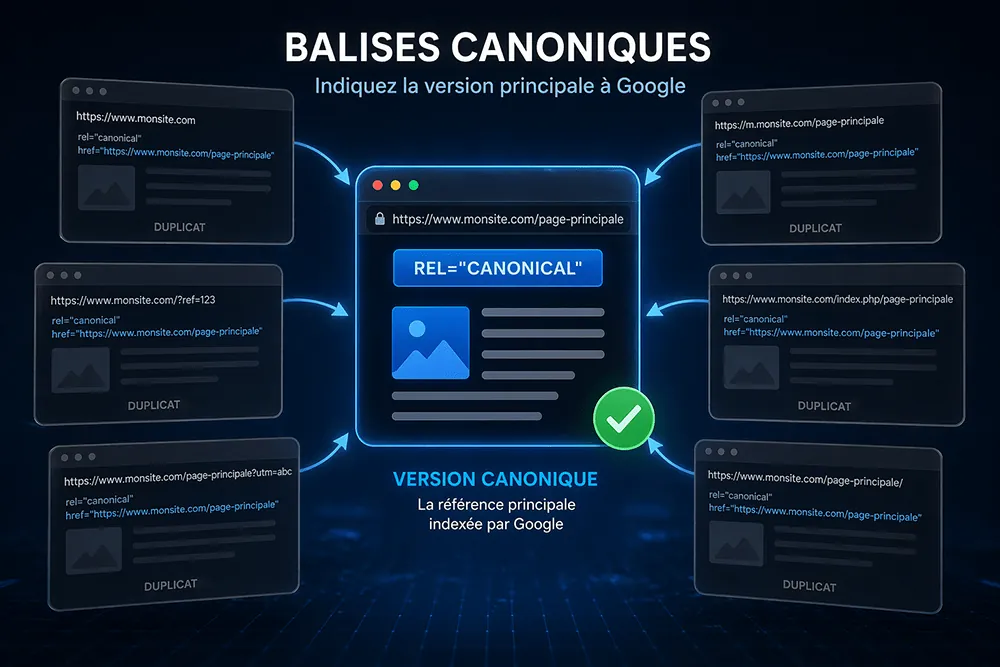
URL variants are the first technical cause of duplication. The same content can be reached through http://mysite.com, https://mysite.com, http://www.mysite.com and https://www.mysite.com — four different URLs for a single page. Without a correctly configured 301 redirect and without a canonical tag, Google may index several of these versions at once, creating internal duplicate content without your knowing.
URL parameters are another major source of duplication. On ecommerce sites in particular, navigation filters (colour, size, price), user session parameters and tracking tags add parameters to the URL — potentially generating hundreds or thousands of URL variants for the same content. Every unique URL is a new page in the eyes of Google’s crawler.
The mobile version of a site, when it is hosted on a separate subdomain (m.mysite.com), creates duplicate content between the desktop and mobile versions. This problem is less frequent today thanks to responsive design, but it still exists on many older sites.
Poorly handled pagination is also a common cause: the first entries of a list of articles or products appear on several paginated pages with different URLs, creating duplication in the first lines of content on each page.
Editorial causes: when the duplication comes from the content itself
Beyond technical problems, content duplication can have purely editorial causes. These cases are often simpler to identify but require some web copywriting work to resolve.
Identical or very similar product pages are the most frequent case in ecommerce. When a site offers products in several variants (colours, sizes, capacities), each variant often has its own URL with a page almost identical to the previous one.
Without canonical handling or an effort to differentiate the editorial content, these pages compete with each other in the search results.
Product descriptions lifted directly from the manufacturer or supplier are another classic cause. Dozens of ecommerce sites use exactly the same descriptions — which creates external duplicate content on a large scale. To stand out, each site must produce its own descriptions, with its own editorial line and its own added value.
Copy-pasting between pages of the same site — an introduction repeated word for word across several blog articles, a presentation text copied from one page to another — generates internal duplicate content that is sometimes hard to detect without a dedicated tool.
Causes linked to a multi-platform presence
A brand or professional being present on several platforms frequently creates external duplicate content, often in good faith and with no bad intent.
Publishing an article on your website and then republishing it in full on LinkedIn, Facebook or Twitter without precautions is common practice — but it can be a problem if Google indexes the version published on the social network before the original version on your site.
The solution: share an excerpt or a summary on social networks, with a link to the original article, rather than republishing the whole text.
Content syndication — publishing the same article on your site and on partner sites — is a legitimate practice within an inbound marketing strategy. But it requires the systematic use of the canonical tag on the syndicated version, to tell search engines that the original version is on your own website.
Also remember to optimise each version published on a partner outlet: a clear citation of the original source, a shortened text compared with the full version, or a rel=canonical link are all good practices to avoid external duplicate content while still benefiting from the partner’s reach.
Without this precaution, you risk seeing your content indexed first on your partner’s site rather than on your domain.
Content theft is a reality on the internet. Some sites copy and paste original content from other sources without permission or citation. This is a case of plagiarised content that you don’t control directly — but that you can monitor and report to Google through the DMCA system.
The impact of duplicate content on your SEO
Impact on indexing: Google has to choose
The first effect of duplicate content on your SEO is an indexing problem. When Google crawls your website and finds several pages with identical or very similar content, it has to choose which one to index as the main version — and which one to ignore or deprioritise in the search results.
This choice isn’t always the one you would have made. Google may select a URL with unfavourable technical features (http instead of https, a long and unreadable URL, the mobile version instead of the desktop version) rather than the version you consider the main one.
And once that choice is made, it can be hard to change without explicit technical intervention — through a canonical tag or a 301 redirect.
Dilution of authority and link juice
Duplicate content dilutes your website’s authority. If several pages with identical or similar content receive inbound links (backlinks), the link juice is spread across all these pages rather than concentrated on a single URL.
The result: none of these pages benefits from all the authority it could have accumulated if the content had been unique and consolidated on a single URL.
This is particularly problematic for strategic pages — product pages, key blog articles, service pages — whose position in the search results depends directly on their relative authority. Duplicate content can therefore seriously harm your SEO strategy without you immediately understanding why.
Wasted crawl budget
Crawl budget is the limited resource Google allocates to exploring your website each time its bot visits. If this budget is wasted on duplicate URLs — pages with no real added value that repeat content already indexed elsewhere — your important pages risk not being crawled often enough, or even not at all.
For large sites with thousands of pages, managing crawl budget is a major SEO issue. Reducing duplicate content is one of the most effective actions for freeing up crawl budget and focusing it on the pages that deserve to be explored and indexed first.
Impact on user experience
Beyond the purely technical impact on SEO, duplicate content has a negative effect on user experience. A web user who lands on two almost identical pages from the Google results is left in a confusing situation: which one should they read?
Which one should they share? Which one should they cite? This confusion harms your site’s credibility and the quality of your communication with visitors.
A website that produces unique, original and well-structured content inspires trust — in the eyes of both users and search engines. It’s the foundation of any lasting and effective organic search strategy.
How to detect duplicate content
Screaming Frog — the benchmark tool for internal audits
Screaming Frog is probably the best tool available for detecting internal duplicate content on a website. This desktop crawler analyses every URL on your site and identifies pages whose content is identical or similar — based on the title tags, meta descriptions and H1 headings, but also on the text content of the pages.
Its duplicate content report shows at a glance which pages are duplicated, which URLs are involved and how similar they are. Essential for any serious SEO audit, Screaming Frog is available as a free version (up to 500 URLs) and a paid version for larger sites.
Siteliner — spot duplicate content on your own site
Siteliner is a free online tool specialised in detecting on-site duplicate content. It crawls your website and identifies pages that share common content, calculating a similarity percentage for each pair of pages concerned.
Its simple interface and visual reports make it particularly useful for a quick first diagnosis, with no software to install.
Siteliner also identifies pages with content that is too thin or too short — another negative factor for SEO. For a full analysis of your website, it is a valuable complement to Screaming Frog.
Copyscape — check whether your content has been copied
Copyscape is the benchmark tool for detecting external duplicate content — that is, checking whether your original content has been copied and pasted onto other websites without your permission. Enter the URL of a page on your site, and Copyscape searches the internet for pages with identical or similar content.
In the free version, features are limited; the paid version offers unlimited searches and automatic real-time alerts when a new duplicate is detected.
For a web copywriter, an author or a professional whose content is regularly republished without credit, Copyscape is an indispensable tool for monitoring duplicate content and acting quickly in the event of content theft.
Duplichecker and other free tools
Duplichecker is a free plagiarism checker, useful for quickly analysing a text and checking whether identical or similar versions exist on the internet. It is simple to use: paste your text or enter a URL, and the tool analyses the content in a few seconds. The free version is enough for occasional checks.
Kill Duplicate is another tool specialised in detecting and managing duplicate content, particularly used by SEO agencies and SEO professionals. It lets you identify the duplicates on your website in a few minutes and prioritise the fixes to make.
Google Search Console — the search engine’s view
Google Search Console is a free tool from Google that gives you access to the search engine’s actual view of your website. Its coverage report shows indexed pages, excluded pages and the reasons for those exclusions — which often include duplicate content problems (duplicate page, canonical URL flagged by Google as different from the one you declared, and so on).
Google search itself can also be used manually to detect duplicate content: type an excerpt of your page’s text between quotation marks in the Google search bar, and check whether other pages with the same content appear in the results. This simple, free technique is often the first step of a duplicate content audit.
Solutions for avoiding and managing duplicate content
The canonical tag — telling Google the main version
The canonical tag (rel canonical tag) is the most widely used and most effective technical solution for managing duplicate content. It consists of adding to a page’s HTML code a tag that tells search engines which is the main version — the original page — among several pages with identical or similar content.
Its syntax in HTML code is as follows:
<link rel="canonical" href="https://www.yoursite.com/original-page/" />Placed in the <head> section of the duplicate page, this tag tells Google: “I know this page looks like another one, but this URL is the reference version — it’s the one you should index and give the SEO authority to.” The canonical tag is the go-to option for handling URL variants, pages reachable through several paths, and content syndicated on partner sites.
301 redirects — unifying URLs
The 301 redirect is the technical solution to favour when a duplicate URL must be permanently removed or merged with another. It automatically sends users and bots to the destination URL, and passes most of the SEO authority accumulated by the old URL to the new one.
The 301 redirect is particularly suited to resolving protocol variants (http vs https), subdomain variants (www vs non-www), and similar URLs resulting from a migration or a restructuring of the website. It is a radical and effective solution, but it requires changing the code — or even the server configuration depending on the environment — an intervention that calls for technical skills or the help of a professional.
If you’re looking for tools that save you from intervening manually, some CMS plugins such as Yoast SEO or Rank Math include redirect management features that don’t require editing the code directly. A change that is well documented in a tracking plan also avoids regression errors during updates.
The noindex tag — excluding non-strategic pages
The noindex tag is a directive that tells search engines not to index a specific page. Unlike the canonical tag, which passes authority to another URL, the noindex tag simply removes the page from Google’s index without passing on any SEO value.
This solution suits pages that have little editorial value and don’t deserve to be indexed — internal search result pages, filter and sorting pages, terms of use and privacy policy pages, blog tag and archive pages.
By reducing the number of unnecessarily indexed pages, you focus Google’s crawl budget on your strategic pages and improve the overall quality of your presence in the search results.
Creating unique, original content — the editorial solution
The best way to avoid duplicate content is still to create unique, value-adding content from the start. For ecommerce sites, this means writing original product descriptions rather than reusing the manufacturer’s — adopting your own style, your own editorial line and your own sales arguments.
For blogs and content sites, it means producing original, well-researched articles that differ from what already exists on the internet.
Quality web writing is an investment, not an expense. Well-written unique content ranks better in the search results, generates more organic traffic and inspires more trust in users than generic or copied content.
Using a professional web copywriter or an SEO agency specialised in content creation can be particularly useful for sites that need to produce content in volume without sacrificing quality.
Rewriting and rewording — when existing content has to evolve
When duplicate content already exists on your website and cannot be removed (essential product pages, similar service pages), rewriting and rewording are the editorial solutions to favour. The goal is to differentiate the pages enough that Google no longer sees them as duplicates — by adding unique content, changing the structure, and enriching the information specific to each page.
Tools such as Grammarly can help identify wording that is too close and suggest alternatives using assisted rewriting techniques — but rewriting content in depth remains human work that takes time and a good command of web writing.
Using a real-time rewording approach, some writers rely on AI tools to speed up the rewriting of their duplicate content, before reworking the result by hand to ensure quality and originality. An updated publication date, visible on each article or page, can also help Google identify the original version of a piece of content over time.
Monitoring duplicate content over time
Managing duplicate content isn’t a one-off action — it is regular monitoring to build into your SEO strategy. Several practices help you monitor duplicate content over time: scheduling regular crawls with Screaming Frog or Siteliner, setting up Copyscape alerts to be notified in real time when your content is copied on another site, and regularly checking Google Search Console reports to spot new indexing problems linked to duplication.
A clear content policy — defining the rules for publishing, syndicating and using content within your company and with your partners — is also a useful lever for preventing duplicate content at the source.
Web Opteam: your SEO agency to audit and fix duplicate content
The SEO audit: spotting what you can’t see
At Web Opteam, auditing duplicate content is an integral part of every technical SEO audit. Our approach is to crawl your entire website to identify every source of duplication — URL variants, technical parameters, similar pages, untagged syndicated content — and to produce a prioritised report with concrete, actionable recommendations.
Whether you’re a business with a small brochure website or an ecommerce store with thousands of product pages, our team of SEO experts knows how to identify the duplicate content problems that hurt your SEO and propose the solutions best suited to your situation.
Technical and editorial support
Our support goes beyond diagnosis. Web Opteam helps you implement the technical fixes — setting up canonical tags, 301 redirects, noindex directives, URL parameters in Google Search Console — and supports you with an editorial strategy to create unique, quality content over the long term.
We work closely with your writing teams, your developers and your marketing managers to ensure consistent content management across your whole website and your communication platforms — social networks, blog, partner sites.
Training and skills development
Web Opteam offers SEO training dedicated to web writing and content strategy, including a full section on duplicate content: how to identify it, how to avoid it from the creation stage, and how to use the right tools to monitor it over time.
This training is available in person or remotely, and is suited to every level — from beginners to experienced digital marketing professionals.
To find out more about our SEO support and training offer, contact our team directly — we’re here to help you make unique content your best ally in Google search results.
Duplicate content is a problem you can fix — if you can see it
In conclusion, duplicate content isn’t inevitable. It is a technical and editorial problem that can be detected, fixed and avoided with the right tools and good practice. Canonical tag, 301 redirects, noindex, rewriting, regular monitoring: the solutions exist and are within reach of any SEO professional — or any serious SEO agency.
The real risk is doing nothing. Letting duplicate content pile up on your website means letting Google make choices for you — and not necessarily the right ones. It means diluting your authority, wasting your crawl budget and handing your competitors a head start they haven’t earned.
So, ready to audit your site? Start with a Screaming Frog crawl, a Siteliner analysis and a Copyscape check — and you’ll already have a clear idea of the size of the job. And if you need a hand, the Web Opteam team is here — with the tools, the expertise and a genuine desire to make your content shine in Google search results.